Chrome 152 reference
Implements observable Chrome behavior, aligned with Chrome 152.
The website’s own JavaScript. Browser state. No Chromium.
Built for automation.
// Start Mimic separately:
// ./mimic --listen 127.0.0.1:9222 --chrome 152

import { chromium } from "playwright-core";

const browser = await chromium.connectOverCDP(
  "http://127.0.0.1:9222"
);
const context = browser.contexts()[0];
const page = await context.newPage();
await page.goto("https://example.com/");Get up and running locally in a few minutes.
mimic --listen 127.0.0.1:9222Implements observable Chrome behavior, aligned with Chrome 152.
Each Page runs in a single event loop, matching browser semantics.
Runs on CPU. No GPU or system browser installation needed.
Connect stock Playwright or Puppeteer clients over CDP. Mimic owns the runtime; your automation keeps its familiar interface.
Load HTTP pages, evaluate JavaScript, query the DOM, and observe lifecycle and network events.
Use locators, fill form controls, click actions, work across frames and Shadow DOM, and observe popup pages.
Each Page owns its runtime and event loop. BrowserContexts isolate profiles, cookies, and connection pools.
Two project regression suites cover navigation, locators, forms, fetch/XHR, frames, Shadow DOM, popups, redirects, cookies, history, multi-page state, and network observation.
Mimic’s own compatibility checks, not the official Playwright test suite.Fresh Windows build measured September 14, 2026 against Chrome 152.0.7977.82 in controlled local fixtures.
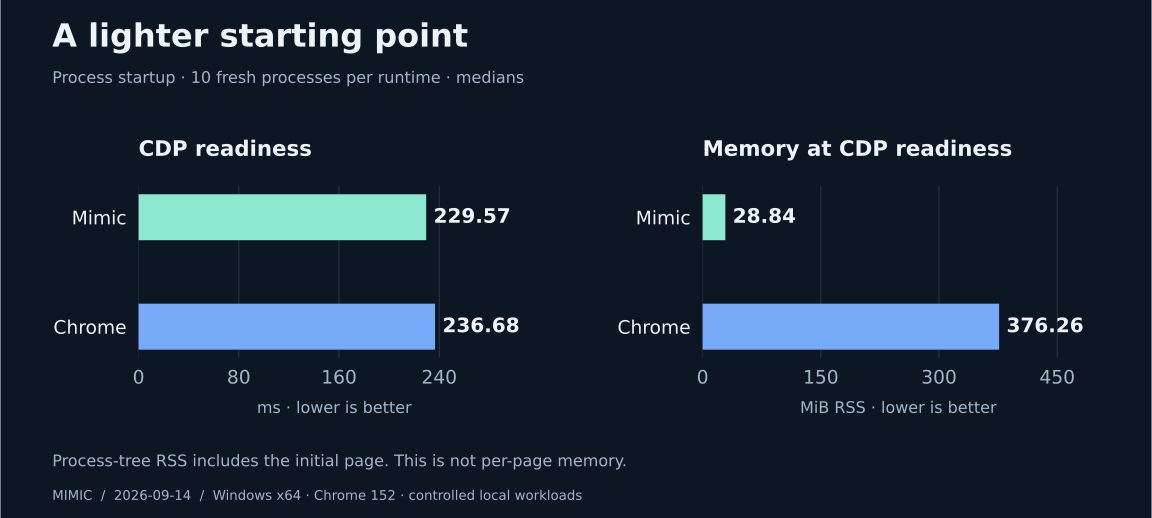
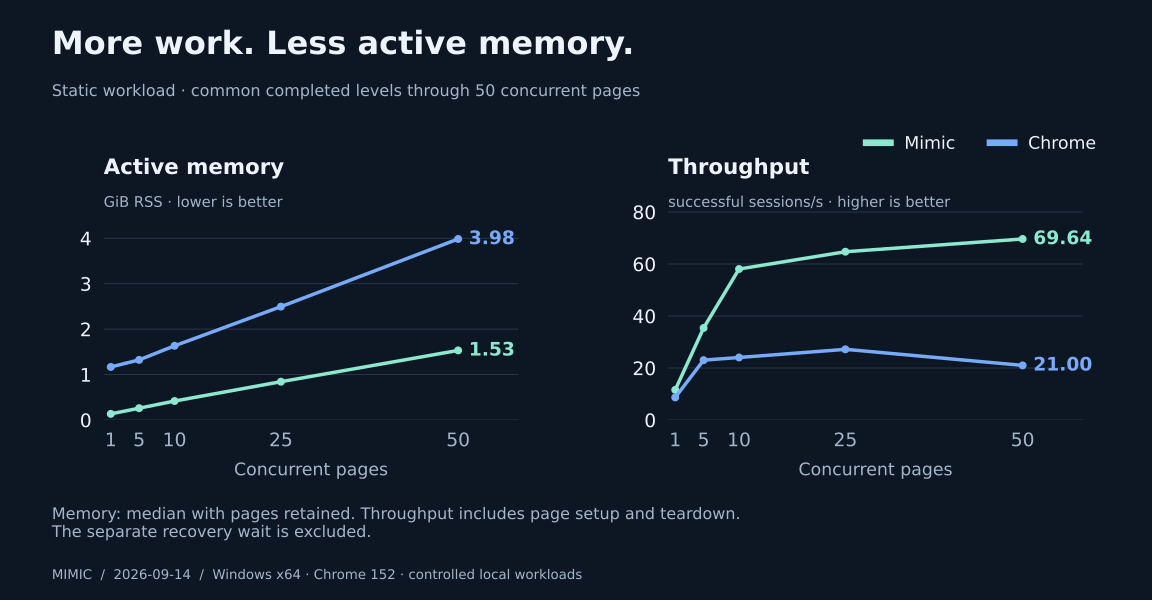
These results describe specific fixtures and this machine, not arbitrary websites or production cost. Some workloads still favor Chrome. Read the methodology →
A versioned profile controls browser-visible screen, locale, hardware, preferences, networking, and supported capabilities before the first page loads.
{
  "schemaVersion": 1,
  "baseProfile": "chrome-152-windows-x64-headful-controlled-v1",
  "hardware": { "logicalProcessors": 8, "deviceMemoryGB": 8 },
  "locale": {
    "languages": ["en-US", "en"],
    "timezone": "America/New_York",
    "intlLocale": "en-US"
  },
  "preferences": { "colorScheme": "dark" }
}Mimic is a public beta and implements a subset of browser APIs and CDP. It is designed for supported execution workflows—not visual output or universal Chrome compatibility.
Download Mimic, start the local runtime, and connect your automation.